Every game shop buys cards from customers, and most of them price those buys by hand: look up the card, check a few listings, guess a fair number. It is slow, it differs from clerk to clerk, and during a release week the numbers go stale within days. A buylist tool does this job from live prices, so every offer is quick and consistent.
This post describes one such tool: who it is for, how it works, which endpoints it uses and what it costs to run in requests per day.
Who it is for
A buylist suits any store that buys singles over the counter or online: a local game shop, a card store with an online buylist page, or a convention booth that buys on the day. It also works as a back-office helper for a seller who buys collections and needs to price a box of mixed cards quickly.
The shop owner sets the rules once, such as "pay 50% of market for cash, 60% for store credit, and never pay for cards under 50 cents". The tool applies those rules to every card.
How it works
The tool has four moving parts: a card list, a price refresh, an offer rule and a quote screen.
1. Build the buylist
Start with the cards you want to buy. Search for them once and store the card_id values in your own database.
GET /v1/sets?game=Pokemon
GET /v1/cards?game=Pokemon&set=Delta Reign&limit=100
The second call returns card_id, name, set, number, rarity, game and image_url for each card, without prices. Page through a set with limit and offset. Do the same for the sets you care about in Magic, One Piece and any other game you stock. New sets appear automatically once they are listed, so you can add them to the buylist the week they release.
Good cards to put on the list first are the headline cards of a fresh set:
 Mega Rayquaza ex - 138/103ME06: Delta Reign$286.98Near Mint Holofoil
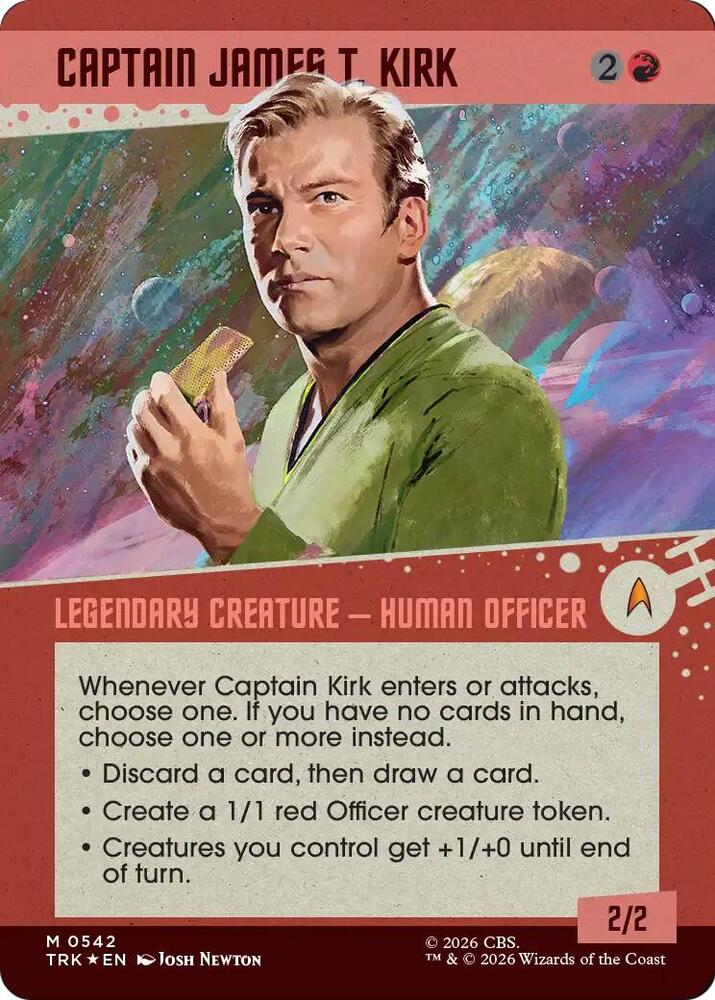 Captain James T. Kirk (Showcase) (Surge Foil)Star Trek$88.22Near Mint Foil
2. Refresh prices in bulk
Market prices refresh every 6 hours, so a refresh job that runs four times a day always has something new to read. Send your card ids in bulk:
POST /v1/cards/lookup
{ "card_ids": ["...", "..."], "condition": "Near Mint" }
The response has a cards list and a not_found list. Each card carries skus, and each SKU has printing, condition, language and market_price. Store the Near Mint market_price for each printing next to the card.
3. Turn the market price into an offer
The simplest rule is a percentage of market_price. A few extra checks keep the shop safe, and each uses a field the lookup already returns:
- If
market_priceisnull, the card has no price. Show "ask a clerk" instead of an offer. - If
listing_price_low(the cheapest copy for sale) sits well undermarket_price, use the lower number as the base, because that is what a customer could pay right now. - If
copies_listedis high andsold_price_countis low, the card is plentiful and slow. Lower the percentage or skip it. - Add a minimum offer and a maximum per card, so one odd number cannot cost you real money.
Prices are passed on exactly as reported, so round the offer yourself, for example down to the nearest 10 cents.
4. Check the trend before you buy big
For cards where you would spend a lot, such as a chase card from a new set, look at recent history first:
GET /v1/cards/{card_id}/history?timeframe=30d
Each history card has skus, and each SKU has daily rows with market_price, sale_price_low, sale_price_high and quantity_sold, plus average_daily_quantity_sold. A card that sells every day at a steady price is a safer buy than one that sold twice last month. After a release, prices often start high and drift down as more boxes get opened, so a lower offer in the first weeks protects your margin.
5. Build the quote screen
At the counter, the clerk types or scans a card name, picks the printing and sees the offer, the market price and the card picture from image_url. A customer with a binder of 60 cards gets a total in a minute. Your own database handles the lookup, so the screen is instant. The only live API calls are the refresh job and the occasional history check.
What it costs to run in requests
Requests count toward your daily limit, and each plan has a maximum number of cards per request: 1 on Free, 20 on Starter, 100 on Pro, 200 on Business and 250 on Enterprise. Starter also allows 1,000 cards a day. Take a shop with a 3,000 card buylist on the Pro plan, at 100 cards per request.
| Job | Requests per run | Runs per day | Requests per day |
|---|---|---|---|
| Price refresh of 3,000 cards | 30 | 4 | 120 |
| History checks on big buys | 1 per card | about 40 | 40 |
| Adding new set cards | about 5 | 1 | 5 |
| Total | about 165 |
That is a small part of the 6,000 requests a day on Pro. The same shop could refresh every 6 hours, add several games and run a public buylist page, and still sit far below the limit. A smaller buylist of 500 cards on Starter (20 cards per request) needs 25 requests per refresh. With Starter's 1,000 cards a day, that buylist can be refreshed twice a day.
A request over a limit gets a 429 response with a Retry-After header, so build the refresh job to wait and try again. GET /v1/usage shows your plan's limits and what you have used, and it is free.
Tips from the counter
- Keep the offer percentages in settings the owner can change, not in code.
- Store the
market_price_calculated_attime and show it on the quote, so staff know how fresh the number is. - Different printings are different SKUs. Make the clerk pick the printing, because a foil and a non-foil can differ a lot.
- Condition matters. Offer on Near Mint and apply a fixed discount for lightly played cards.
What you could build
- A buylist page on your online store where customers enter their cards and get an instant offer.
- A counter app for staff that prices a binder or a whole collection in minutes.
- A weekly "we are paying more for" list for social media, built from the cards with the highest offers.
- A trade-in calculator that mixes cash and store credit rates.
- A collection appraisal service for people who inherit a box of cards.
- A restock alert that tells you which cards you are buying cheaply and selling slowly.
Every paid plan allows commercial use. A small shop can start on Starter, and a shop that refreshes thousands of cards several times a day will want Pro.